How AI helps me leaving work so I can pick it back up
I work across several projects and can’t keep every detail in my head. Here’s how I use folders, handover notes and AI to pick up where I left off.
A normal working week for me involves moving between several projects. I might spend a morning working on software, then leave it to work on a technical strategy or prepare for a meeting. Sometimes I get back to the software that afternoon. Sometimes it’s the following week.
My brain can only hold so much of that at once, so while I’m working on something, I know which files matter, what I’ve tried, what’s finished and what still needs a decision. A few days later, I have to piece some of it together again.
So I try to leave work in a state that I can pick back up as quickly as possible. The problem is, I forget to do this quite regularly! Recently, I've been looking at how AI can help me record where I’ve stopped and recover my place (as quickly and as easily as possible) when I return. It needs somewhere to find that information beyond the conversation we happen to be having.
Give the work somewhere to live
Each of my projects has a reasonably consistent folder structure (intentionally), with places for context, a definition of what I’m trying to do, source material and drafts. The context points to the relevant documents, code and project records. Older drafts have their own place, so I can find the current version without comparing five similarly named files - no more report_final_v2_finalfinal.docx!
I also have a scheduled task that reviews and keep notes on decisions and a work log recording what moved, where the result is, and what happens next. When I return, I usually start with that next action. It might be a change to make, a question I haven’t answered, or something waiting on another person.
If I’ve considered three approaches and chosen one, I want to keep a sentence about why. Otherwise I can spend the start of the next session going through the same argument again, sometimes with an AI assistant enthusiastically suggesting the approach we already ruled out, if it remembers at all!
I can read these notes myself, or ask the assistant to read them before we continue.
Leave yourself a handover
You can start with one project you regularly leave and return to. Give it a home, link to the current work, and leave a short note before switching away.
An AI assistant can draft that note from the work you’ve been doing together:
Summarise where we’re leaving this work: what changed, links to the current files, decisions we made, anything unresolved, and the next concrete action. Distinguish what you checked from what you couldn’t verify.
For a piece of software, the result might look like this:
What changed: Fixed the mobile navigation and tested it locally.
Where it is: On thefix/mobile-navigationbranch. The changes are committed; no pull request yet.
What’s unresolved: I haven’t checked it on a real phone.
Next: Open it on my phone, check switching between rounds, then create the pull request.
For a document, the note might say that the first draft is finished, link to it, explain that the delivery date depends on a supplier’s reply, and leave an instruction to update the timeline when that reply arrives.
“Continue proposal” doesn't really help - I already knew that! “Update the timeline when the supplier replies” tells me the action and what’s holding it up.
I read the handover while the work is still fresh. It’s much easier to catch a wrong filename or an overstated claim then than a week later.
Use AI when you come back
When I return, I can ask the assistant to read the project context and latest handover, inspect the relevant files, and help me work out where to resume:
Read the project context and latest handover. Check the current work against that note. Tell me where I left it, anything that has changed since, and the next action. Say which sources you couldn’t check.
A note can accurately describe where I stopped and still be out of date when I return. I might have made a change in another session, or someone else might have edited a shared document.
The assistant can do some of that reading and comparison for me. I want links back to the files and records it used, so I can follow up where something is unclear. If it can’t reach a source, I need to know that before relying on its account.
Bringing it together
Even with the folders and notes, I can end up checking several systems or folders before continuing. I’ve started building a small tool to bring those sources into one place.
An example project I connected was Pub Quiz Creator. The tool reads the code on my laptop, checks GitHub, looks at the project’s document metadata and checks the live site.
One fix had been written and tested, but was still sitting among uncommitted changes on my laptop. I needed to commit and ship it before users would see it. Another change had reached the live site; the tool found its CSS in the stylesheet being served to visitors.
A note saying “worked on the fix” wouldn’t tell me which situation I was returning to. The files and deployment check showed how far each change had got.
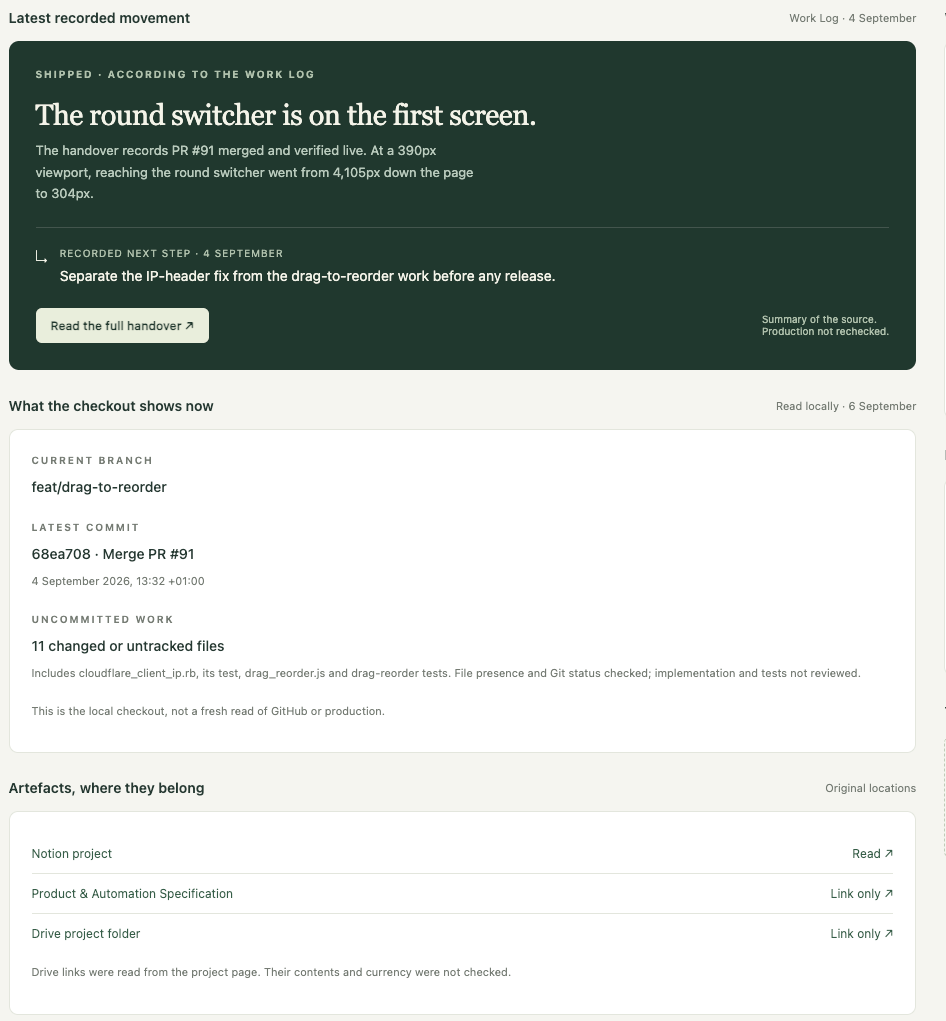
The first version is incomplete. At the end of that weekend, its Notion connection was still outstanding, so the work logs and recorded next actions weren’t available alongside the files and code. It showed that connection as missing.
You can try the handover with the folders and AI assistant you already use. Before you switch away from your next piece of work, ask your AI to record where you’re leaving it. Check the note, save it with the project, and ask the assistant to read it when you return.